
6.4 KiB
FFR: Feed to Fediverse Router



Routes news articles to Fediverse communities. FFR polls a set of sources, extracts each article, and posts it to the Lemmy communities you map it to, either automatically or after you approve it.
It is meant to run unattended on your own server: point it at a source, map that source to a community, and let it publish on a schedule you control.
Screenshots
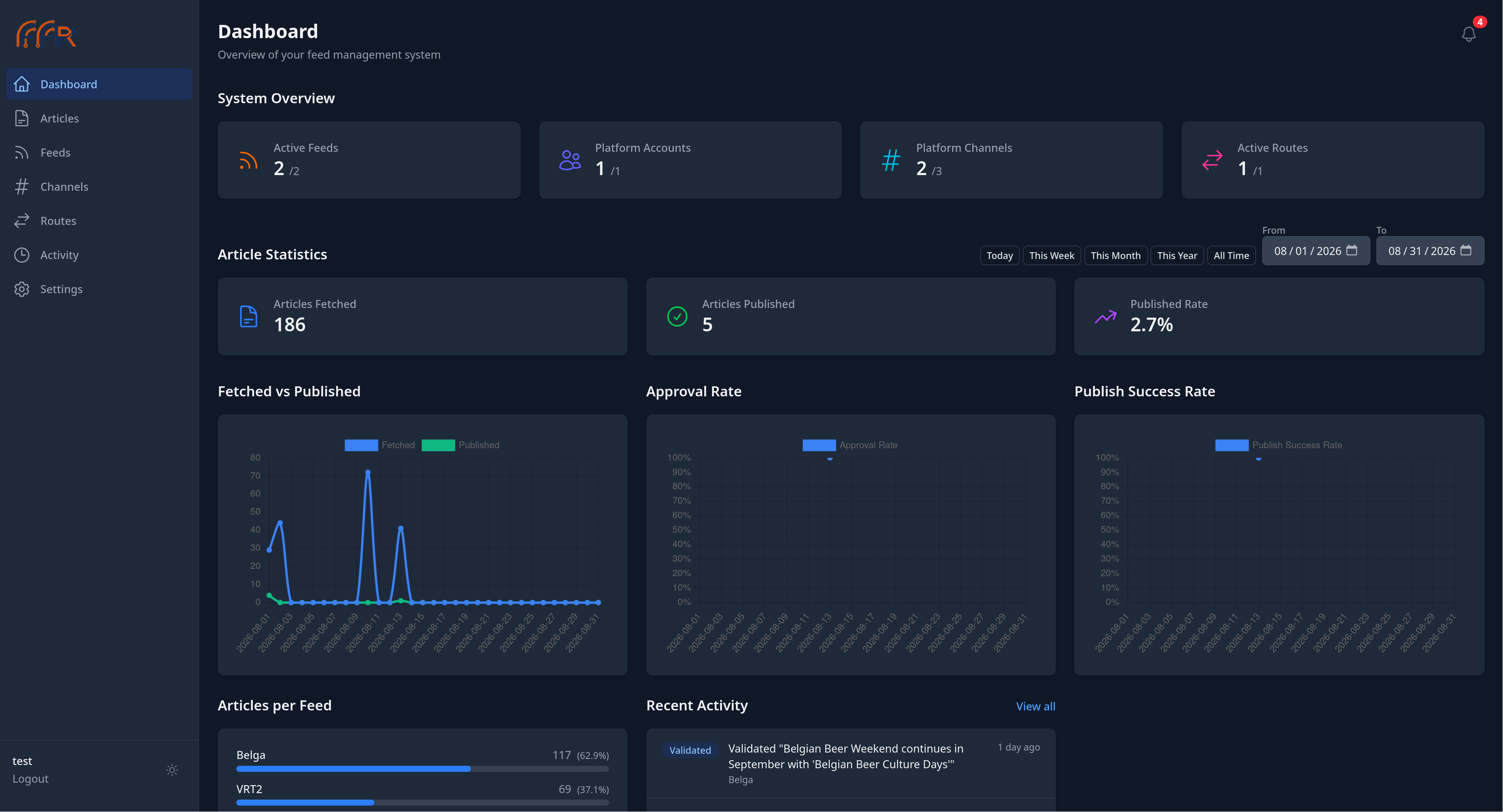
The dashboard, showing article volume over a selected range, approval and publish success rates, and per-feed breakdowns.
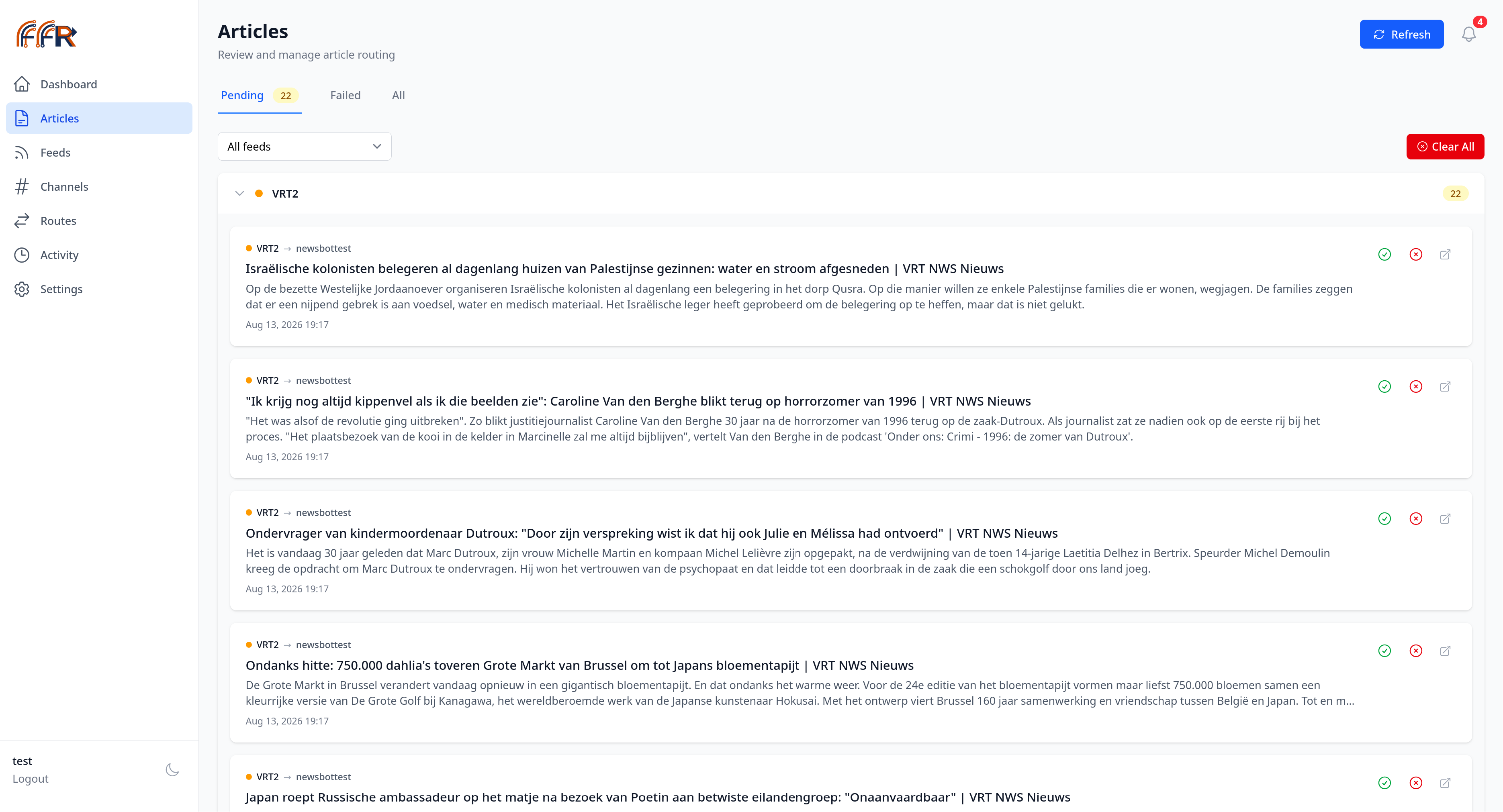
The review queue. Each row is one feed and community pairing, grouped by feed, with the routing shown above the headline.
Features
- Article routing: map each source to one or more Lemmy communities, with optional keyword filtering
- Approval workflow: review articles before they publish, or let them go out automatically
- Publishing controls: a global interval and an optional daily cap, so a source returning a large batch cannot flood a community
- Dashboard: articles fetched and published over time, approval and publish success rates, and per-source and per-community breakdowns
- Activity log: a chronological record of what the automation has done
- Health checks: warnings for sources that stop producing articles and for platform credentials that stop working
- Dark theme
- Single container: FrankenPHP serves the app, with MariaDB and Redis alongside
Sources and platforms
FFR ships with parsers for three sources:
| Source | Type |
|---|---|
| VRT News | Website |
| Belga | Website |
| The Guardian | RSS |
Some sources publish a usable feed and some do not, so a source is either read
from RSS or scraped from its pages. Either way a parser handles it, registered
in config/feed.php.
Adding a source means implementing ArticleParserInterface (three methods:
canParse, extractData, getSourceName) and registering it. See
CONTRIBUTING.md.
Lemmy is currently the only supported platform.
Self-hosting
Images are published to forge.lvl0.xyz/lvl0/fedi-feed-router. The example below
pins a release tag; check Releases
for the current one, and the CHANGELOG before upgrading.
docker-compose.yml
services:
  app:
    image: forge.lvl0.xyz/lvl0/fedi-feed-router:v1.4.0
    container_name: ffr_app
    restart: always
    ports:
      - "8000:8000"
    environment:
      APP_KEY: "${APP_KEY}"
      APP_URL: "${APP_URL}"
      DB_DATABASE: "${DB_DATABASE}"
      DB_USERNAME: "${DB_USERNAME}"
      DB_PASSWORD: "${DB_PASSWORD}"
      REDIS_HOST: redis
      REDIS_PORT: 6379
    volumes:
      - app_storage:/app/storage
    depends_on:
      - db
      - redis
    healthcheck:
      test: ["CMD", "curl", "-f", "http://localhost:8000/up"]
      interval: 30s
      timeout: 10s
      retries: 3
      start_period: 40s

  db:
    image: mariadb:11
    container_name: ffr_db
    restart: always
    environment:
      MYSQL_DATABASE: "${DB_DATABASE}"
      MYSQL_USER: "${DB_USERNAME}"
      MYSQL_PASSWORD: "${DB_PASSWORD}"
      MYSQL_ROOT_PASSWORD: "${DB_ROOT_PASSWORD}"
    volumes:
      - db_data:/var/lib/mysql

  redis:
    image: redis:7-alpine
    container_name: ffr_redis
    restart: always
    volumes:
      - redis_data:/data

volumes:
  db_data:
  redis_data:
  app_storage:
Environment variables
| Variable | Required | Description |
|---|---|---|
APP_KEY |
Yes | Encryption key. Generate with: echo "base64:$(openssl rand -base64 32)" |
APP_URL |
Yes | Your domain (e.g. https://ffr.example.com) |
DB_DATABASE |
Yes | Database name |
DB_USERNAME |
Yes | Database user |
DB_PASSWORD |
Yes | Database password |
DB_ROOT_PASSWORD |
Yes | MariaDB root password |
Usage
On first run FFR walks you through onboarding. After that:
- Add a channel on the Channels page. A channel is a Lemmy community on a given instance, together with the account that posts to it. The community is picked from the instance, so a typo cannot create a channel that fails later.
- Add a feed on the Feeds page, choosing one of the supported sources.
- Add a route on the Routes page, mapping a feed to a channel. Keywords on a route restrict it to articles that match.
Articles are then discovered on a schedule. Each one becomes a row per matching route, so an article routed to three communities is three separate decisions. Approve one on the Articles page and it publishes to that route's community; publishing failures come back to you on the Failed tab rather than retrying silently.
Publishing runs every five minutes, one article per run, bounded by the daily cap if you set one.
Development
NixOS / Nix
git clone https://forge.lvl0.xyz/lvl0/fedi-feed-router.git
cd fedi-feed-router
nix-shell
The shell prints the available commands and can start the containers for you.
| Command | Description |
|---|---|
dev-up |
Start the development environment |
dev-down |
Stop the development environment |
dev-restart |
Restart the containers |
dev-rebuild |
Rebuild the images |
dev-shell |
Enter the app container |
dev-artisan <cmd> |
Run an artisan command |
dev-logs |
Follow the application log |
dev-logs-db |
Follow the database log |
| Service | URL |
|---|---|
| App | http://localhost:8000 |
| Vite | http://localhost:5173 |
| MariaDB | localhost:3307 |
| Redis | localhost:6380 |
Other platforms
Contributions welcome for development setup instructions on other platforms.
Contributing
Issues and pull requests are welcome. See CONTRIBUTING.md for the development setup, the checks that run in CI, and the commit conventions.
For bugs and questions, use Issues.
Note on AI assistance
This project was developed with AI assistance.
License
FFR is free software, licensed under the GNU AGPL-3.0.